

[OTM] How to upgrade OTM integration with HERE
Question
You have Oracle Transportation and Global Trade Management (OTM) integration with HERE maps.
There are 429 error or other integration isssues require you to register and use the new HERE platform services and new credentials.
For example, you may have the following HERE properties configuration that needs to be upgraded to the latest API key credentials and API endpoints: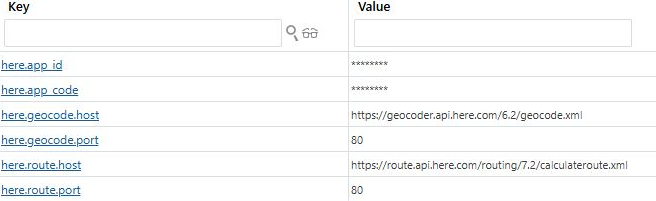
Short Answer
Integrating HERE service is a feature on OTM, so you need to search the documentation or support from the OTM team.
On HERE side, you need to register a new platform account to get new API keys, look up HERE documentation to update the HERE service host.
You can search "API key", "geocode", or "routing" on https://www.here.com/docs for the new host URLs and the method to get an API key.
On OTM side, you need to review your configuration of the HERE properties settings as the above screenshot shows and other integration settings.
Long Answer
Since this is not am OTM support channel we recommend you use public resources or the OTM documentation and support.
1. You can ask online AI assistant the question: how to integrate oracle OTM with HERE maps with API key?
NOTE: The following answer needs to be tested and verified by yourself
a. Obtain an API Key from HERE:
Register on the HERE development portal and create a project. This project will be provided with an App ID.
Generate an API key within this project. You can generate up to two API keys at any given time. These keys can be rotated by deleting one and generating a fresh one.
b. Configure Oracle OTM Properties:
Set the necessary properties in Oracle OTM to enable integration with HERE Maps.
This includes updating the here.api_key property with the API key obtained from HERE.
c. Update to the Latest API Version:
Ensure you are using the latest version of the HERE Maps API.
As of the latest updates, HERE recommends using version 3.1 of their Maps API.
Update the custom property here.useLatestApiKey to true to use the latest API version.
d. Set Additional Properties:
Configure additional properties as required by Oracle OTM for the integration.
These properties are not configured by the installer and need to be set manually.
Refer to the Oracle OTM documentation for the specific properties that need to be set.
e. Testing and Validation:
After configuring the properties, test the integration to ensure that Oracle OTM can communicate with HERE Maps and that the mapping functionalities are working as expected.
By following these steps, you should be able to successfully integrate Oracle OTM with HERE Maps using an API key.
For detailed instructions and specific property settings, refer to the official Oracle OTM documentation and HERE Maps API documentation.
2. With the reference links in the above answer, you can navigate to OTM documentation page and find guides for HERE intergation with OTM:
https://docs.oracle.com/en/cloud/saas/transportation/25c/otmol/configuration/how_to_set_up_here.htm
https://docs.oracle.com/en/cloud/saas/transportation/25c/otmol/properties/here/here_engine_properties.htm
Note that most of the HERE service host URLs in the above Oracle documentations are deprecated and you cannot access them by yourself directly.
If you want to resolve this issue by yourself, please try updating the HERE service host address by looking up their latest on https://www.here.com/docs
However, Oracle as a HERE partner may still have the access, please contact Oracle support if you have any issue with following the guides.
Note
For example, geocode and routing host URL should be updated respectively as follows:
https://geocoder.ls.hereapi.com/6.2 -> https://geocode.search.hereapi.com/v1/geocode
https://route.ls.hereapi.com/routing/7.2 -> https://router.hereapi.com/v8/routes
Last but not least, the integration with HERE is a feature on OTM maintained by Oracle, so please consult OTM support channel for further help.