

Upload Interactive Map Layer (IML) & visualize it
How to upload & visualize IML
Detailed description of steps how to upload to platform.here.com IML
Upload
1. Create some catalog on https://platform.here.com/data/
1. before do it above you already should have access to your realm olp-
2. In created catalog: create some layer IML - layer type is "Interactive map"
3. Create an app on https://platform.here.com/admin/apps
1. There create apikey - for your client application
2. And create OAuth2.0 credentials - for upload your data to IML (not forget to save 'credentials.properties' file on local disk)
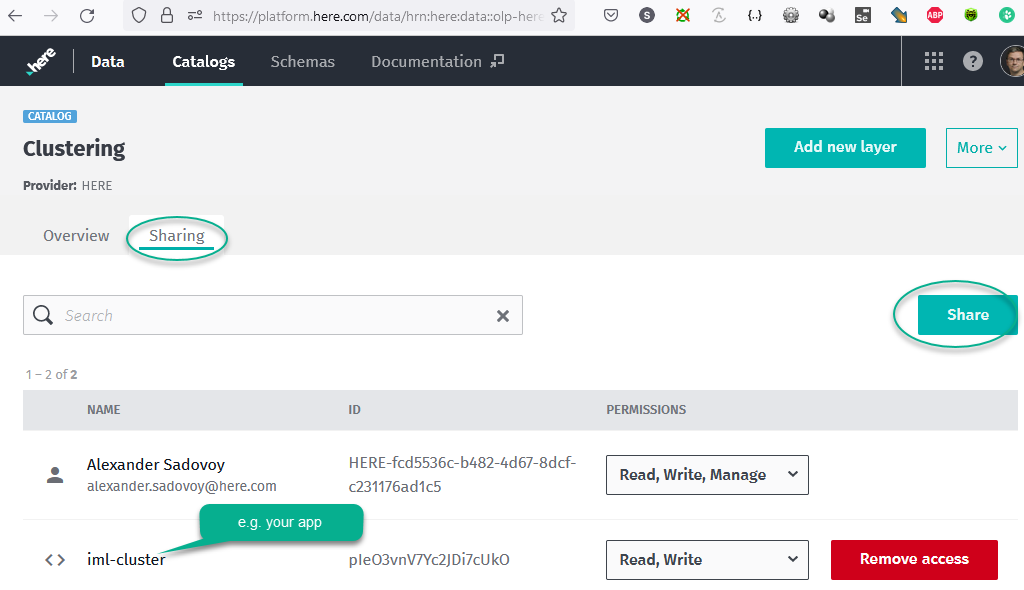
4. Make sharing your catalog with created above app in step 3. Similar in screenshot:
1. 
5. You need to have preinstalled OLP CLI first (https://developer.here.com/documentation/open-location-platform-cli/user_guide/index.html)
1. Create a file with your data in GeoJson format (https://en.wikipedia.org/wiki/GeoJSON)
2. upload your data with command line: olp catalog layer feature put --data --credentials
3. Like example:
olp catalog layer feature put hrn:here:data::olp-here:clustering big_data --data path_to_your_geojson_file\points.json --credentials "path_to_your_platform_credentials\credentials-iml.properties"
6. Now you can inspect your IMLayer on https://platform.here.com/data/hrn:here:data::olp-here:clustering/big_data/inspect
1. Where hrn:here:data::olp-here:clustering should be created above catalog id instead
2. big_data - created above IMLayer
Test in example client application
Now you can replace in two lines in file \here-interactive-map-layer-examples\examples\clustering\js\index.js of example on https://github.com/heremaps/here-interactive-map-layer-examples/tree/main/examples/clustering
These two lines with your catalog id and layer id:
var clusterUrl = (ralRes, clustering, chain) => { return `[https://interactive.data.api.platform.here.com/interactive/v1/catalogs/hrn](https://interactive.data.api.platform.here.com/interactive/v1/catalogs/hrn/):here:data::olp-here:clustering/layers/big_data/tile/web/{z}_{x}_{y}?apiKey=${apikey}${chain=='All'?'':'&p.retailer='+chain}&clustering=${clustering}&clustering.relativeResolution=${ralRes}`};

var retailUrl = (chain) => { return `[https://interactive.data.api.platform.here.com/interactive/v1/catalogs/hrn](https://interactive.data.api.platform.here.com/interactive/v1/catalogs/hrn/):here:data::olp-here:clustering/layers/big_data/tile/web/{z}_{x}_{y}?apiKey=${apikey}${chain=='All'?'':'&p.retailer='+chain}&mode=viz`};
yarn build
yarn start
HERE Maps API for Javascript client application example:
https://demo.support.here.com/examples/v3.1/iml_clustering