

Manipulating HTML Elements on the Map with HTML, CSS, and JavaScript
Enhancing Map UI with Advanced HTML, CSS, and JavaScript Techniques via direct manipulating HTML Elements on the Map with HTML, CSS, and JavaScript
Sometimes, it's necessary to reposition a logo, modify the color or size of the 'Terms and Conditions' text, or move it in relation to the map. The functionality provided by the JavaScript API library may be insufficient for these tasks. In such cases, direct manipulation of HTML and CSS can be utilized to achieve the desired customization. This involves using HTML to access and modify the structure of the page elements, CSS for styling and adjusting visual properties like color and size, and JavaScript for more dynamic interactions or position changes in response to user actions or events within the map interface.
Example
document.querySelector(".H_rdo_title.H_el").innerText = "Map menü";
document.querySelector(".H_imprint").style.top = "0px";
document.querySelector(".H_imprint").style.bottom = null;
document.querySelector(".H_copyright").style.top = "0px";
document.querySelector(".H_copyright").style.bottom = null;
Result: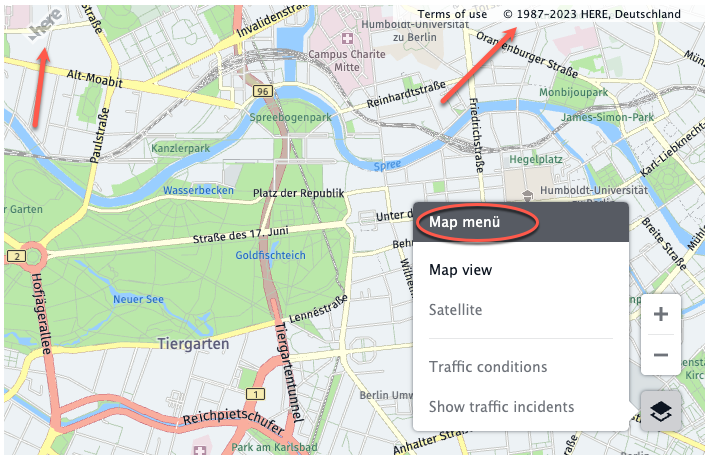
Try this on https://jsfiddle.net/xu942o7j